Fix common problems
Updated November 5, 2026Find the message you see in the app, then follow the fix. Most problems are one setting in Telegram.
“Secretary Mode is off for this bot”
In @BotFather: /mybots → your bot → Bot Settings → Secretary Mode → Turn on. Then paste the token again. Older guides call this setting “Business Mode”.
“Token didn’t work” or “Token revoked”
- Token didn’t work: copy the whole token from @BotFather, including the part before the colon.
- Already connected to another account: each bot belongs to one CreatorInbox account. Create a new bot.
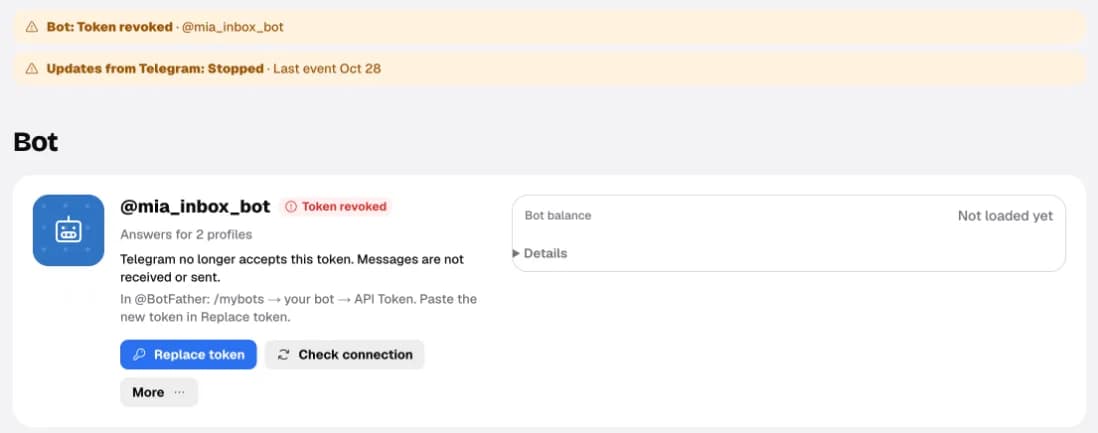
- Token revoked: Telegram no longer accepts the token, so messages aren’t received or sent. In @BotFather:
/mybots→ your bot → API Token, then in Accounts tap Replace token and paste the new one.
“The bot can read but not reply”
In Telegram, open Settings → Chat Automation (older versions: Telegram Business → Chatbots) and turn on Reply to messages. Then tap Check again in the setup guide, or Check connection in Accounts.
In Accounts → Profiles, open Permissions under a profile to see what the bot may do there. It should say can reply.
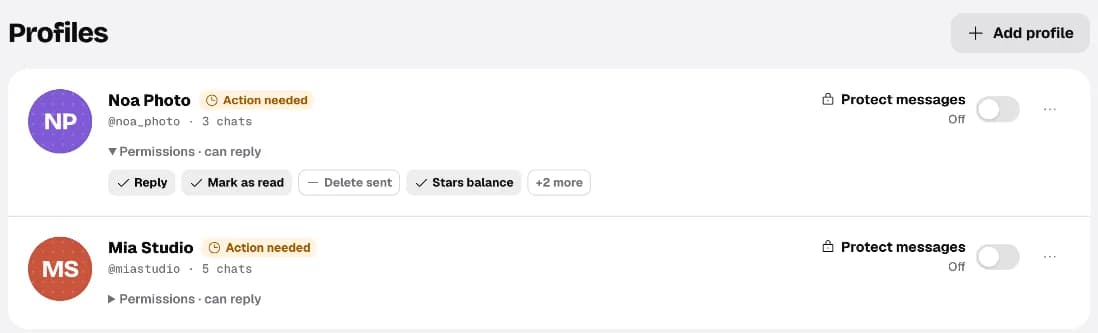
Protect messages stops buyers from forwarding or saving what you send. Paid content is always protected.
No messages arrive
- Write from a different Telegram account. Messages to yourself don’t count.
- Check Accounts: the bot should be connected and the profile listed. A profile that turned the bot off in Telegram needs to add it again in Chatbots.
- Chats from before you connected the bot aren’t imported. History starts when the bot was added.
“Reply window closed”
Telegram lets a business bot reply only within 24 hours of the buyer’s last message. After that the chat shows Reply window closed, and you can’t send replies or offers there. Your draft is saved; once the buyer writes again, you can reply. Closing soon in the inbox warns you before it happens.
A buyer has no photo or name
Photos show only when Telegram lets your bot see them. If a buyer hides their photo in Telegram’s privacy settings, or the bot is disconnected, you see initials. The chat works normally.
The AI didn’t reply
- AI couldn’t finish this reply in a chat: the AI provider didn’t answer. Reply yourself, or wait for the next message.
- Couldn’t run in the checkup: those tests aren’t counted. Run the checkup again later.
- Paused everywhere on the AI page: tap Resume.
- Drafting only · AI message limit reached: your plan’s AI messages are used up, so Autopilot chats get drafts. Buy extra messages or upgrade in Billing.
- The AI is off in every chat after you revoked the data permission. Allow it again under AI → More → Data & permission.
- Autopilot is greyed out: run a checkup on your saved settings. Every Safety test must pass. See Turn on Autopilot.
Still stuck? Write to support@creator-inbox.com with what you see on the screen.