How to sell digital products on Telegram
Last verified November 8, 2026What you can sell
Anything that fits in a file: PDF guides and ebooks, Lightroom presets and LUTs, beats and sample packs, brushes, ZIP archives, photo sets and videos. On the web, photos can be up to 10 MB and videos (MP4, H.264) and other files up to 50 MB, Telegram’s limit for bot uploads. Bigger files, up to 2 GB, you send to your bot in Telegram: see How to sell large files on Telegram.
You don’t need a website or a checkout page. Buyers pay with Stars inside Telegram, and if they don’t have enough, Telegram offers to buy them at checkout. Setup of the bot takes about 5 minutes: see Get started.
1. Upload your files to the library
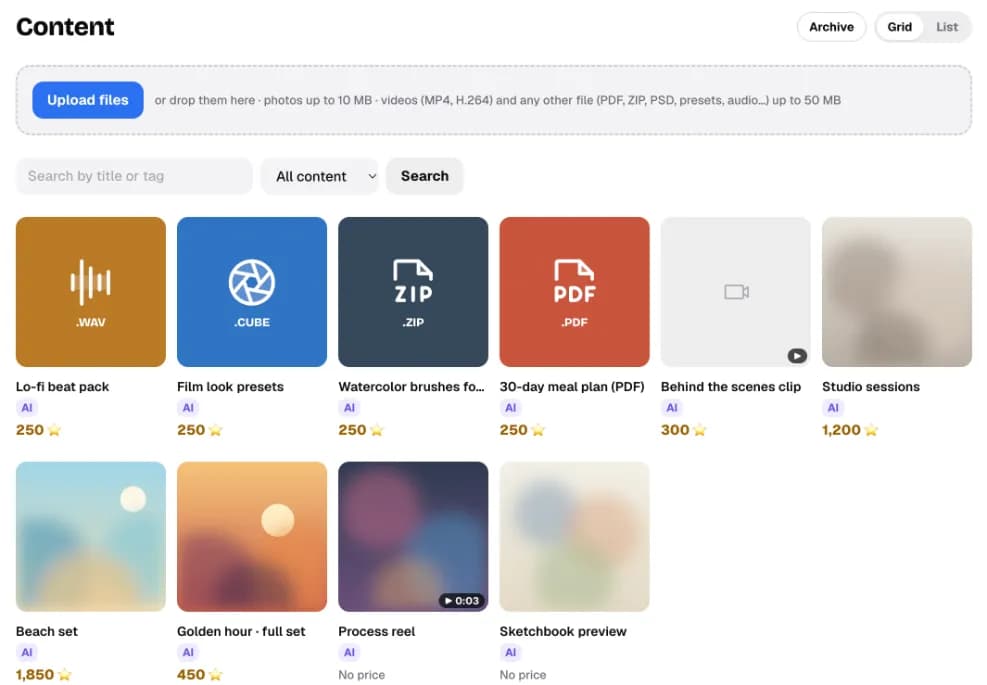
Open Content and tap Upload files, or drop files onto the page. Each item becomes a tile with its title and its price in Stars. A small AI tag means the AI is allowed to offer that item.
2. Set a price and a private description
Open an item. Price, Stars is what a buyer pays by default. You can still change the price on a single offer when you send it, anywhere from 1 to 25,000 Stars.
The Description is seen only by you and the AI. Write what’s inside and who it suits, for example “12 warm film presets for portraits, works in Lightroom mobile”. The AI uses it to answer buyers’ questions about the item.
To see what a price in Stars is worth to you, use the Telegram Stars calculator. Telegram sets the rate and can change it.
3. Choose the role: Paid or Teaser
- Paid: sent only inside an offer, after payment. This is the default for anything you sell.
- Teaser: can go out for free, before the offer, as a preview. Only photos and videos can be teasers; a file like a PDF or ZIP can’t.
4. Decide what the AI may sell, and its lowest price
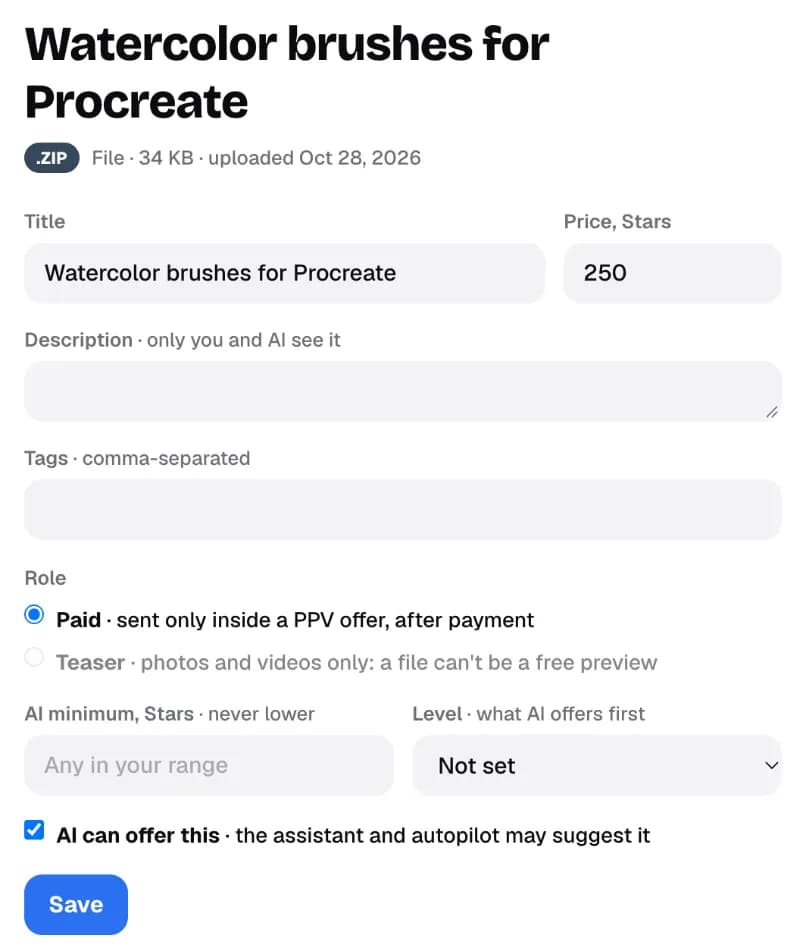
- AI minimum is the lowest price the AI may accept for this item. The label says never lower: the AI won’t go below it, even if a buyer asks.
- Level tells the AI what to offer first: Starter items for new buyers, Premium after a purchase.
- AI can offer this controls which items the AI may suggest. Leave it off for anything the AI shouldn’t sell.
The AI is part of the Pro and Studio plans. On Start you send every offer yourself, and these settings simply wait until you turn the AI on.
5. Send a paid offer in a chat
- Pick the filesIn the chat’s side panel, tap Create PPV and pick up to 10 files from your library.
- Set the price and a captionQuick prices come from your library, and you see what this buyer paid before.
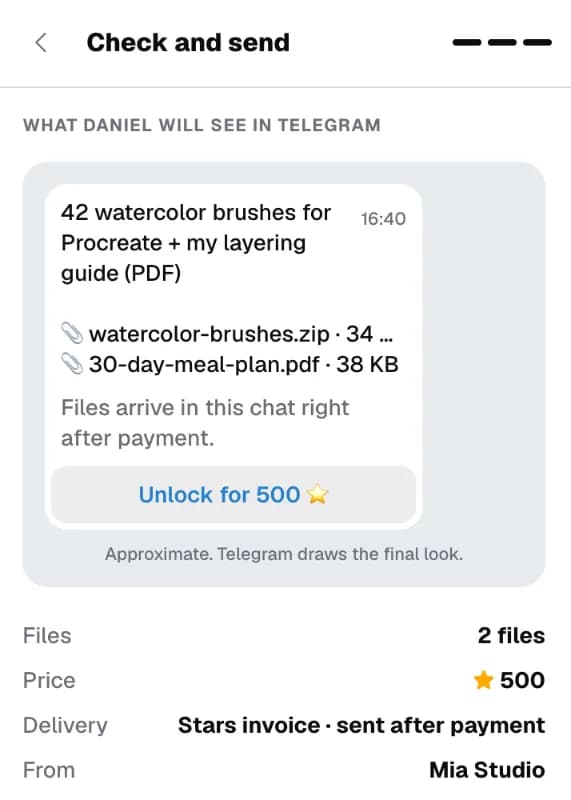
- Check and sendTap Preview as buyer, check it, then Send.
The buyer sees your caption, the file names and an Unlock button. Photos and videos show as a blurred preview that unlocks in place. After payment, files arrive in the same chat, and the sale shows in Sales.
What it costs
On the free Start plan, CreatorInbox takes 5% of your sales. On Pro and Studio your own sales carry no fee; there’s a share only of sales the AI makes. Details are in CreatorInbox pricing explained. Telegram’s share is built into the Star rate, separately.
Every screen in this article is covered in more detail in the guide: Sell files and paid offers.
Questions
Can I sell files on Telegram without a website?
Yes. A bot can send a Stars invoice inside the chat and deliver the file right after payment. With CreatorInbox that bot is your own, connected to your Telegram account through Telegram Business.
What kinds of digital products can I sell?
Any file: PDFs, presets, LUTs, beats, brushes, ZIP archives, photo sets and videos. On the web, photos can be up to 10 MB and videos (MP4, H.264) and other files up to 50 MB. Send bigger files, up to 2 GB, to your bot in Telegram.
How do buyers pay?
With Telegram Stars, inside Telegram. They tap Unlock and confirm. If they don't have enough Stars, Telegram offers to buy them at checkout.
Where does the money go?
To your own bot's Stars balance. CreatorInbox never holds or moves your Stars. You withdraw them in Telegram through Fragment.
Can the AI sell my files for me?
On Pro and Studio, yes, but only items marked “AI can offer this”, and never below the AI minimum you set for each item.
How much is a Star worth?
Telegram sets the rate and can change it. Use the Telegram Stars calculator on this site to turn a price in Stars into dollars.